How to Automate Complex Business Workflows Using Next.js, Laravel, and AI Agents
Combine the speed of Next.js with the transactional power of Laravel and AI agents to automate complex business tasks with zero headaches.
Umar Farooq
System Architect & Full-Stack Engineer
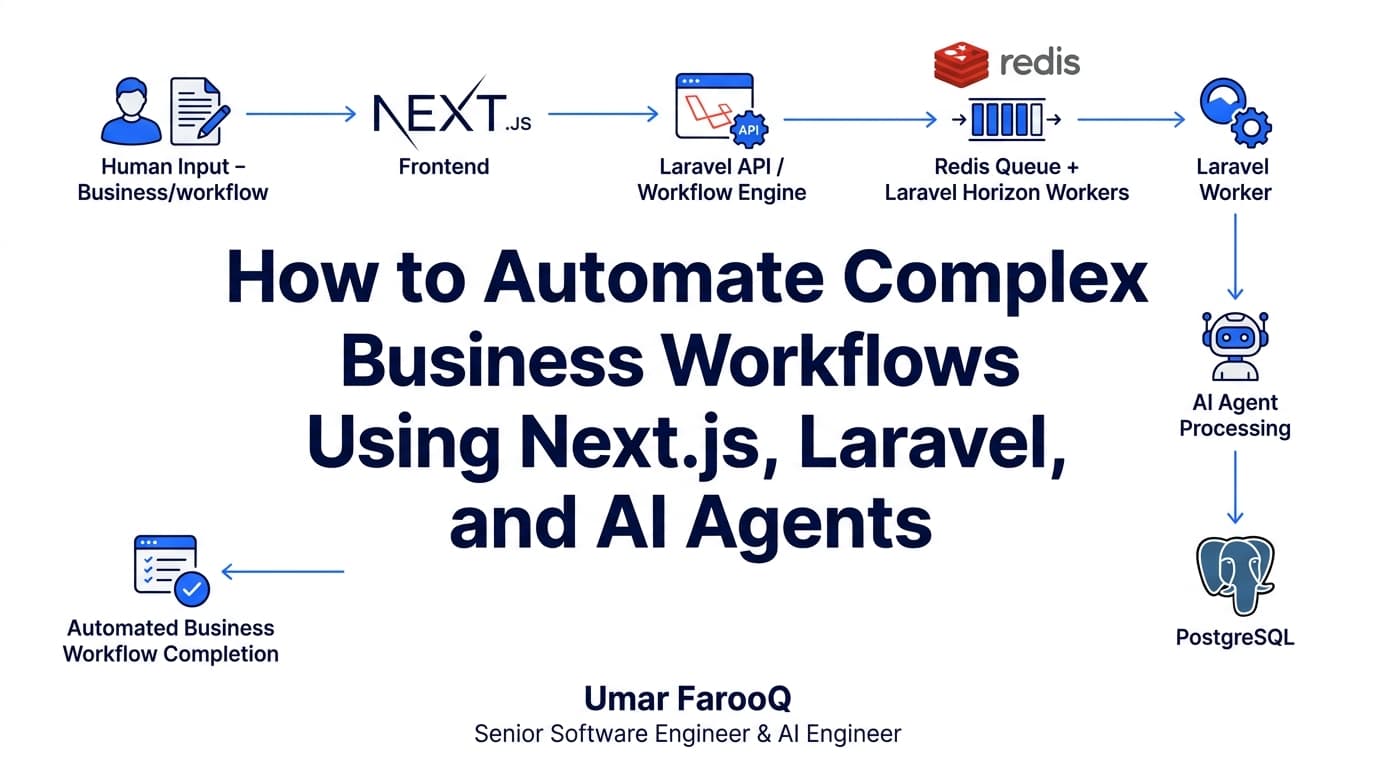
Direct Answer: Automating complex business workflows requires pairing a fast Next.js frontend for responsive human interaction with a robust Laravel backend for asynchronous queue processing and AI agent orchestration. By isolating heavy document parsing into Redis background workers and enforcing strict database state machines, enterprise platforms achieve end-to-end automation with sub-second UI responsiveness.
Enterprise operational workflows—such as commercial supply chain approvals, insurance claims triage, and multi-warehouse logistics—are notoriously intricate. They involve multiple human roles, conflicting document formats, third-party payment gateways, and strict regulatory compliance requirements.
Attempting to build these systems inside a single monolithic framework or through brittle no-code automation tools inevitably causes scalability failure. Having architected full-stack enterprise systems across Saudi Arabia and remote corporate operations, I have refined a decoupled architecture that delivers exceptional performance: pairing Next.js on the frontend with Laravel and AI agents on the backend.
The Hybrid Architecture: Dividing Responsibilities Cleanly
A production automation platform requires three distinct operational layers:
The Presentation Layer (Next.js): Delivers sub-40ms user interfaces with optimistic UI updates, keyboard-first navigation, and real-time WebSocket status indicators.
The Workflow Orchestration Layer (Laravel): Manages relational database transactions, authentication policies, scheduled cron jobs, and resilient background queues supervised by Laravel Horizon.
The Intelligence Agent Layer: Executes multimodal document extraction, anomaly detection, and automated tool calling via modern AI SDKs and vector search.
System Architecture: Next.js + Laravel + AI Agents Pipeline
Here is how data flows through this decoupled enterprise architecture:
Architecture Layer | Primary Technology Stack | Core Operational Responsibility | Performance Target |
|---|---|---|---|
Frontend UI | Next.js 15 (React 19, Tailwind) | User interactions, form entry, and real-time progress | < 50 ms edge response time |
API Gateway | Laravel REST / GraphQL | Authentication, request validation, and rate limiting | < 30 ms validation latency |
Queue Workers | Laravel Horizon + Redis | Asynchronous PDF rendering and webhook dispatches | Guaranteed zero-drop delivery |
AI Agent Engine | Anthropic Claude / OpenAI SDK | Document parsing, schema extraction, and triage | 3 to 8 seconds async completion |
Database Layer | PostgreSQL with connection pooling | ACID transactions, audit logs, and vector embeddings | Sub-15ms relational queries |
Production Code: Decoupled Workflow Ingestion Pipeline
Below is a production Next.js Server Action dispatching an incoming workflow document to the Laravel queue engine for asynchronous agent processing:
// src/server/actions/workflowIngestion.ts
"use server";

import { auth } from "@/lib/auth";

export async function submitWorkflowDocument(formData: FormData) {
  const session = await auth();
  if (!session?.user?.id) throw new Error("Unauthorized");

  const file = formData.get("document") as File;
  if (!file) throw new Error("Missing document payload");

  // Dispatch multipart upload to Laravel asynchronous processing endpoint
  const backendUrl = process.env.LARAVEL_API_URL + "/api/v1/workflows/ingest";
  const forwardData = new FormData();
  forwardData.append("file", file);
  forwardData.append("userId", session.user.id);

  const response = await fetch(backendUrl, {
    method: "POST",
    headers: {
      "Authorization": `Bearer ${process.env.INTERNAL_SERVICE_TOKEN}`,
    },
    body: forwardData,
  });

  if (!response.ok) {
    throw new Error(`Workflow dispatch failed: ${response.statusText}`);
  }

  const { trackingId } = await response.json();
  return { success: true, trackingId };
}
Ensuring Zero-Downtime Reliability with Redis Queues
Because AI extraction jobs take several seconds to execute, running them inside synchronous HTTP web requests will inevitably trigger serverless timeouts. By dispatching tasks to Laravel Horizon queues with Redis, your Next.js application returns an instant confirmation tracking ID while background workers process documents with automatic exponential retries.
Frequently Asked Questions
Why use Laravel with Next.js instead of a pure Node.js backend?
Laravel provides an unmatched, battle-tested ecosystem for enterprise workflows: native queue monitoring with Horizon, robust database migrations, scheduled cron jobs, and database transactions that require writing thousands of lines of boilerplate code in pure Node.js.
How do Next.js and Laravel communicate securely?
They communicate via secure internal REST endpoints or webhooks authenticated with rotating JWT bearer tokens or mutual TLS (mTLS), ensuring that internal backend services are never directly exposed to the public internet.
How long does it take to implement this architecture?
A production-ready foundation with Next.js frontend, Laravel queue backend, and automated AI document extraction can typically be designed, tested, and deployed to production within four to six weeks.
Summary & Architecture Guidance
For enterprise reliability, idempotency keys must be enforced across every webhook and asynchronous job transition. When external vendor webhooks deliver duplicate events during transient network interruptions, our Laravel queue workers store transaction tokens in Redis with a 24-hour expiration window. If a duplicated payload arrives, the job logs an informational notice and terminates immediately without triggering secondary agent reasoning loops. For complete setup steps, inspect the Laravel Queues & Horizon Documentation. This deterministic safety check guarantees that automated purchase orders, notification dispatches, and warehouse inventory adjustments remain strictly consistent across multi-tenant production databases.
Automating complex enterprise workflows is the highest-ROI software investment a growing business can make. By decoupling your interactive Next.js user experience from resilient Laravel background workers, you build software that scales effortlessly.
In our Next.js SaaS development practice and enterprise Laravel engineering practice, we specialize in building high-throughput automation architectures.
To discover more about our full-stack engineering track record, visit my About Me page or explore case studies on our Engineering Blog.
Ready to automate your company's complex business workflows with modern architecture? Book an architecture consultation directly on my Connect page.

Umar Farooq
Author & ConsultantSpecializes in Laravel, Next.js, and AI products. 5+ years enterprise experience with 80+ delivered platforms and full source code ownership.
Related Engineering Insights

PHP2Shell: Why Governments Took Their Own Websites Offline
When two flaws in PHP were disclosed on 21 October, governments did not wait to see what happened. They switched their own websites off. This is the full story of PHP2Shell, why around 70% of the web is exposed, and the one fix that actually works.

PHP2Shell: How to Check Your PHP Version and Fix It Today
Two critical flaws in PHP itself, rated 9.2 out of 10, let anyone run code on an unpatched server without a login. Updating WordPress does not fix this. Here is how to check your PHP version, patch it, restart it properly, and confirm you are safe.
The 10-Minute Database Check Every Vibe-Coded App Needs Before Launch
A timed 10-minute database security checklist for vibe-coded apps: find tables with Row Level Security off, lock them down with policies, and verify like an attacker, with exact SQL included.