Reading ZATCA E-Invoices With a Vision Model in Laravel
Saudi suppliers still send invoices as PDFs and photos. Here is how I wire a vision model into Laravel to read them: image to structured JSON, then validation against ZATCA's required fields before anything reaches Fatoora.
Umar Farooq
System Architect & Full-Stack Engineer
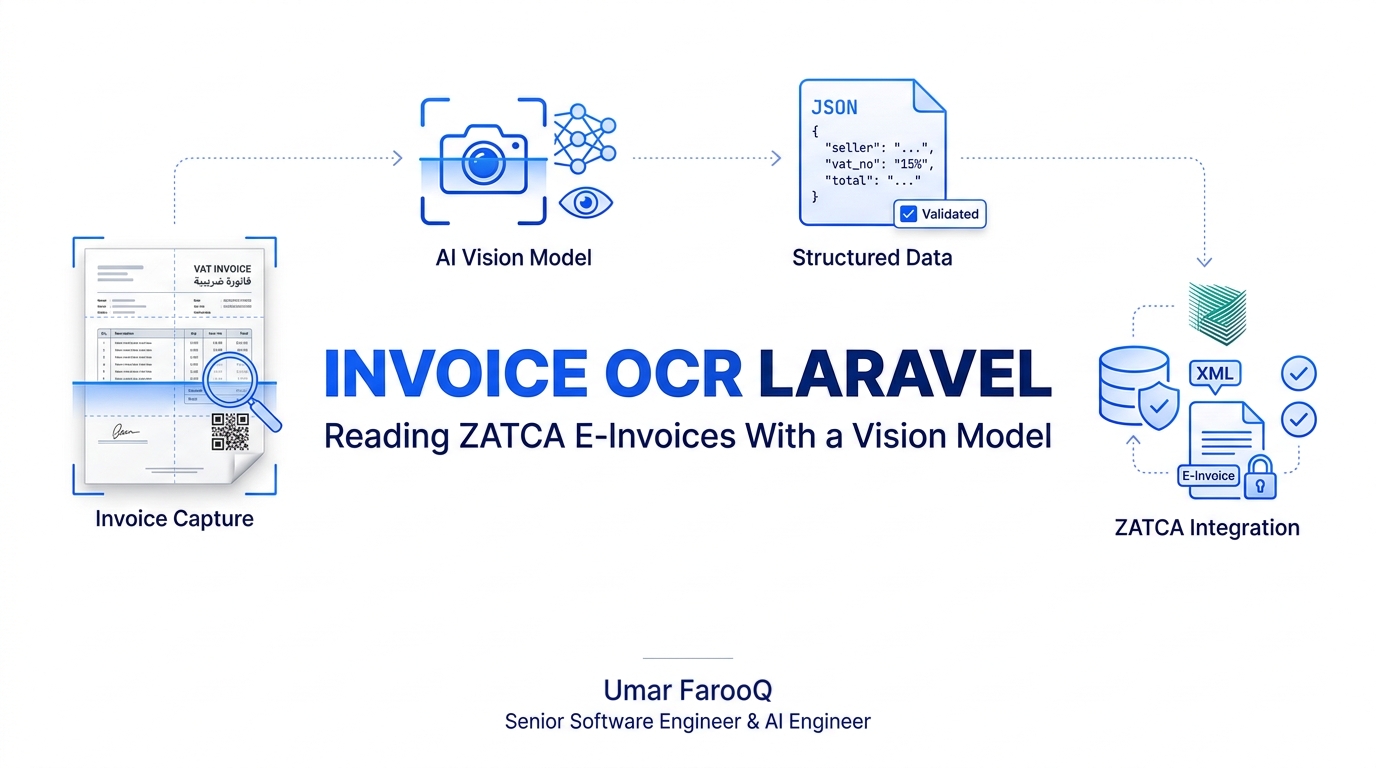
Invoice OCR Laravel: Reading ZATCA E-Invoices With a Vision Model
Every week, supplier invoices land in a Saudi business as PDF attachments and phone photos of paper receipts. The accountant opens each one and types every line by hand: seller name, VAT number, dates, line items, totals. It is slow, boring work, and typos slip in. This is exactly where an invoice OCR Laravel pipeline earns its keep. A vision model reads the document image and returns clean fields. Your app checks them against ZATCA rules before anything moves toward Fatoora.
Quick Answer: A vision model is a multimodal LLM that reads images, not just text. It extracts invoice fields better than classic OCR. It understands layout: tables, mixed Arabic and English, and stamps. The invoice OCR Laravel flow has four steps. Upload the document. Send the image to the vision model with a strict JSON schema. Validate the fields and the arithmetic, then show a human review screen before anything moves toward Fatoora.
One Invoice, One Blurry Phone Photo
Picture a Tuesday morning. Your warehouse clerk in Riyadh receives a box of air filters and brake pads from your auto-parts supplier. The driver hands over a paper invoice. The clerk snaps a photo on his phone and forwards it to the accountant.
The photo is not great. Glare washes out the top left corner. The supplier's rubber stamp sits right on top of the VAT number. The totals row is half cropped at the bottom of the frame. This invoice will now ride through all five stages of the pipeline. Watch what happens to it, what can go wrong, and the guard that catches each problem.
What ZATCA Actually Requires
Before wiring any AI into invoicing, know what the regulator demands. ZATCA is Saudi Arabia's tax authority, and Fatoora is its e-invoicing platform. Phase 2, the integration phase rolling out in turnover-based waves, requires every invoice to be:
Generated as UBL 2.1 XML, the standard structured business-document format.
Digitally signed with XAdES using a ZATCA-issued certificate.
Linked into a hash chain referencing the previous invoice's hash.
Carrying a TLV QR code with seller name, VAT number, timestamp, invoice total, and VAT amount. Phase 2 adds the invoice hash and stamp.
Submitted to Fatoora: standard (B2B) invoices need clearance before reaching the buyer; simplified (B2C) invoices are reported within 24 hours.
For wave tracking, follow Invopop's Saudi Arabia e-invoicing coverage. For the technical requirements, read VATCalculator's Phase 2 guide.
The pipeline below feeds the front of this process: messy documents into clean candidate data. Signing and submission belong to a certified e-invoicing solution. My ZATCA Phase 2 Laravel integration guide covers the signing and API side. My Fatoora API error-handling guide covers rejected submissions.
Stage 1: Capture
What happens
The clerk uploads the phone photo through a simple form in your Laravel app. The app accepts PDF, PNG, and JPG. If the file is a PDF, the app converts each page to an image first. The original file gets stored exactly as uploaded.
What could go wrong
The photo might be too blurry to read, like our warehouse photo with the glare. The totals row might be cropped. The file might be a photo of an elbow instead of an invoice. Garbage in means garbage out, and no AI can fix a document it cannot see.
The guard
Reject unreadable uploads with a clear message. "Too blurry, please retake the photo" beats a confident misread every time. Ask the clerk to check three things. All four corners visible. No glare on the totals. The VAT number not covered. A polite rejection at upload time is the cheapest guard in the whole pipeline.
Stage 2: Extract
What happens
The app sends the image to a vision model with a strict JSON schema. A vision model is a multimodal LLM that reads images, not just text. It understands document layout: tables, columns, mixed Arabic and English, even stamps overlapping the text. The schema names each field, its type, and which fields are required. That includes seller name, VAT number, dates, and line items. Line items carry quantity, unit price, and line total. Header totals come too: subtotal, VAT amount, and total.
The model returns JSON. The app stores the raw extraction beside the original image. The pattern is the same as what you can actually build with AI in Laravel today. Send structured prompts, get structured answers.
What could go wrong
The model misreads digits more often than words. A 3 becomes an 8. The stamped-over VAT number gets guessed from a smudge. Mixed Arabic and English line items get split into the wrong columns. If the prompt is loose, the model invents a plausible invoice number. It will not admit it cannot read the field.
The guard
The last sentence of the prompt matters most: "Use null when unreadable. Never invent values." A model that writes null for an unreadable field is honest. A model that invents a VAT number is a liability. This is the core of invoice OCR Laravel work: the model reads, the app verifies.
Stage 3: Validate
What happens
The app runs the extracted fields through ZATCA-aware checks before any human sees them. Required fields get checked first: seller name, VAT number, issue date, total. Then the format checks: Saudi VAT numbers are 15 digits, starting and ending with 3. Then the arithmetic: subtotal plus VAT must equal the total. For money, always compare with bccomp, never with plain float math.
Here is the whole validation logic in one short service class:
<?php
namespace App\Services\AI;
class ZatcaFieldValidator
{
    public function validate(array $f): array
    {
        $errors = [];
        foreach (['seller_name', 'seller_vat_number', 'issue_date', 'total'] as $k) {
            if (empty($f[$k])) $errors[] = "Missing field: {$k}.";
        }
        if (! preg_match('/^3\d{13}3$/', (string)($f['seller_vat_number'] ?? ''))) {
            $errors[] = 'VAT number format invalid.';
        }
        if (bccomp(bcadd((string)($f['subtotal'] ?? 0), (string)($f['vat_amount'] ?? 0), 2), (string)($f['total'] ?? 0), 2) !== 0) {
            $errors[] = 'Totals do not add up.';
        }
        return $errors; // empty means clean
    }
}
What could go wrong
Strict rules flag edge cases that are actually fine. A legit discount makes the naive subtotal math fail. Rounding differences of one halala trip the totals check. Arabic-Indic and Western digits sometimes mix on the same invoice. Normalize them first, or the raw text compares wrong.
The guard
Validate before humans see the data. Normalize digit shapes before any arithmetic. Route every flag to the review screen, never auto-correct. A wrong total caught here is a one-click fix. At Fatoora, it is a rejected submission.
Stage 4: Human Review
What happens
The reviewer sees the extracted fields beside the original image, with validation errors highlighted. In our warehouse story, the VAT number field shows as empty. The model wrote null because of the stamp. The totals row is flagged because the photo cropped it. The reviewer reads the number off the paper invoice, types it in, and clicks approve.
What could go wrong
A tired reviewer might click approve without looking. Make errors impossible to miss: red highlights, big labels, and a short list of what needs attention. Blind approval is the one failure this stage cannot fully guard against.
The guard
Show the image and the fields on the same screen, so checking is fast. Highlight every validation error in red. Only confirmed, validated data moves on. The review step is also where Arabic invoices get a careful eye. The model handles mixed Arabic-English line items and right-to-left layouts well. A human glance still catches the odd swapped column.
Stage 5: Queue for Fatoora and Archive
What happens
Approved data leaves the intake pipeline and enters your certified invoicing flow. That flow generates the UBL 2.1 XML. It applies the XAdES digital signature with your ZATCA-issued certificate. It links the hash chain, builds the TLV QR code, and submits to Fatoora. Standard invoices wait for clearance. Simplified invoices go out and get reported within 24 hours. For the signing side, this Phase 2 implementation walkthrough covers XAdES signing and hash chains in detail.
What could go wrong
Fatoora rejects the submission: a wrong certificate, a broken hash chain, a malformed QR payload. A rejected invoice edited by hand after signing breaks the chain. Know the rejection codes before they hit you. That is why my Fatoora error-handling guide exists.
The guard
Queue submissions with retries, and never auto-edit signed data. If Fatoora rejects an invoice, fix the source data and re-sign. Do not patch the signed XML. Keep the original phone photo archived with the record. ZATCA requires invoice archiving for years. The scan is your evidence if a number is ever questioned.
Why invoice OCR Laravel Works for ZATCA Intake
This is not theory. A distribution client in Riyadh received supplier invoices as email PDFs and phone photos. Their accountant typed each one in by hand. I built an invoice intake pipeline in their Laravel app. Upload the file, and a queued job sends the image to a vision model with a strict extraction schema. The model returns seller name, VAT number, dates, line items, and totals as JSON. The app validates the fields and the arithmetic, then shows a review screen.
Data entry changed from typing every invoice by hand to reviewing pre-filled fields. Mismatched totals get flagged at upload time, not during month-end reconciliation. The lesson from that project: vision models read document layout far better than classic OCR. But extraction is a suggestion, not a fact. The validation layer is the actual product.
Invoice OCR Laravel in Production: Hard Lessons
Vision calls take seconds and occasionally time out, so run them as queued jobs with a status UI. Never run them synchronously. A blocked form tempts users to skip retries and re-upload the same file.
Watch the digits on Arabic invoices. They handle Arabic script, mixed Arabic-English line items, and right-to-left layouts well. But Arabic-Indic and Western digits sometimes mix on the same invoice. Normalize digit shapes before arithmetic checks, or the totals math will fail on good invoices.
My Mada gateway comparison is a different domain. The lesson is the same: external calls belong behind queues. Saudi specifics (currencies, scripts, regulations) always need their own checks.
Frequently Asked Questions
What does invoice OCR in Laravel do?
It turns supplier invoices (PDFs, scans, phone photos) into structured data inside a Laravel app. A vision model reads the document image and returns fields like seller name, VAT number, and totals as JSON. The app then validates those fields against ZATCA rules before a human reviews them.
What is the difference between clearance and reporting?
Clearance applies to standard B2B tax invoices. The invoice goes to ZATCA's Fatoora platform first, gets stamped, and only then may reach the buyer. Reporting applies to simplified B2C invoices. You issue the invoice immediately and report it to Fatoora within 24 hours.
Can a vision model replace ZATCA-compliant invoicing software?
No. A vision model turns document images into candidate data. It does not produce signed UBL 2.1 XML, manage hash chains, or hold a ZATCA-issued certificate. Those belong to a certified e-invoicing solution. The vision pipeline feeds the front of the process, not the end.
How accurate is vision-model invoice extraction?
Better than classic OCR on real-world documents, because the model understands layout. But it is not perfect. Digits are the weak spot, so the validation layer checks arithmetic on every invoice. Design for fast draft plus verification, never blind trust.
What fields does ZATCA require on an e-invoice?
At minimum: seller name, seller VAT number, invoice timestamp, invoice total with VAT, and the VAT amount. All of these go into the TLV QR code. Phase 2 adds the invoice hash and stamp to the QR payload, plus the full UBL 2.1 XML body with line items.
Should I call the vision model during the upload request?
No. Vision calls take seconds and occasionally time out. Run them as queued jobs with a status UI, so the upload form stays fast. Synchronous processing would hang the form and tempt users to skip retries. Queues also make it easy to retry a failed extraction automatically.
Does this work for Arabic invoices?
Yes. Vision models handle Arabic script, mixed Arabic-English line items, and right-to-left layouts without special configuration. Still validate carefully. Arabic-Indic and Western digits sometimes mix on the same invoice. Normalize digit shapes before arithmetic checks.
What happens when the model reads a digit wrong?
The validation layer usually catches it, because a misread digit breaks the totals math. The flagged invoice goes to the review screen. There, a human reads the correct digit off the original image. This is why validation runs before humans see the data. It is also why "use null, never invent" is in the prompt.
Start With One Supplier
Do not rebuild your whole accounting flow at once. Pick one supplier and run a small batch of their invoices through the five stages. Tune the validation rules on real documents. Then expand. The pipeline pays for itself the first month the accountant stops typing invoices by hand. If supplier invoice intake is eating your team's hours, message me here.

Umar Farooq
Author & ConsultantSpecializes in Laravel, Next.js, and AI products. 5+ years enterprise experience with 80+ delivered platforms and full source code ownership.
Related Engineering Insights
PHP2Shell: Why Governments Took Their Own Websites Offline
When two flaws in PHP were disclosed on 21 October, governments did not wait to see what happened. They switched their own websites off. This is the full story of PHP2Shell, why around 70% of the web is exposed, and the one fix that actually works.
PHP2Shell: How to Check Your PHP Version and Fix It Today
Two critical flaws in PHP itself, rated 9.2 out of 10, let anyone run code on an unpatched server without a login. Updating WordPress does not fix this. Here is how to check your PHP version, patch it, restart it properly, and confirm you are safe.
The 10-Minute Database Check Every Vibe-Coded App Needs Before Launch
A timed 10-minute database security checklist for vibe-coded apps: find tables with Row Level Security off, lock them down with policies, and verify like an attacker, with exact SQL included.